
About a week ago I saw a post in Auto Shop Owners Group (ASOG) on Facebook by Chuck Scroggs III (see full post here) about how you can use ChatGPT to help you with SEO. It was a great post and it made me think of a question a lot of people ask me: what's the difference between what we do at Service Stories and what you could do alone with ChatGPT?
In this post I'll outline exactly how you could achieve the same or very similar outcome without using Service Stories. We'll break down Chuck's prompt, I'll provide you alternative platforms you could use for content creation, content distribution, analytics, and anything else you'd need. I'll also provide time and cost estimates so you can determine what's the best decision for you and your business.
Is it cheaper to do this all on. your own? Maybe literally, from a dollar perspective depending on how you put it together. The big "is it cheaper" question really comes down to how you define "cheaper" and what kind of time you have in your life to create, edit and distribute content. Yes, you can replicate Service Stories with ChatGPT — but I'll leave that decision up to you after we get through this article.
If you can't see the Facebook post because you're not a member of the ASOG Facebook group, here's what Chuck posted:

1. First, provide ChatGPT the context it needs to understand your business. Ideally you'll create a project with artifacts to keep these details in memory and build upon them over time. Here's the prompt Chuck suggested:
I need you to act as an SEO expert with experience in Google Business Profile, Websites, and social media. You understand the auto repair industry and its highest revenue services. [Shop Name] specializes in the following services: [Service One], [Service Two], [Service Three], [Service Four], [Service Five]. Review our website at [website address] and our Google Business Profile at [GBP Link] and evaluate our SEO strengths and weaknesses per platform. Write a detailed report on our current state of SEO and any recommendations you have. Ask any questions you have.
It's likely that this prompt will get you a great head start. To really get the true value you should spend some time speaking back and forth with ChatGPT to help it learn more about you. Save these details to your project by selecting "Save to project" or "Add to project sources" and this will be reusable for future conversations.
2. Revise your website and GBP based on its recommendations, as much as you trust it. If you are just starting out and have no sense of how good or bad your site and its content is, this is probably okay but also not guaranteed to work. ChatGPT is often quite accurate but I don't recommend anyone blindly trust these AI systems at this point in history. What I've generally found is that they'll get you 60-80% of the way there and then the last mile is industry expertise. Remember, these AI systems are trained on the best knowledge from Reddit, Quora, YouTube and other things that can be found on the internet. And to be fair, that's A LOT of knowledge, but remember it's a law of averages and usually the most expert advice is still in someone's head. Expect AI can get you 80-90% of the way there on its best day but you still need human judgement with Large Language Models like ChatGPT, Google AI and others.
3. If you decide to take its advice, ask ChatGPT to re-evaluate until you and it agree that you're satisfied.
4. Now you can start to generate content for your site. Chuck's suggested next prompt:
For each service we provide you will write one long form post and two short form posts that will engage our social media audience. Here is the post format you need to follow with every post you write: Strong hook to stop the scroll, Talk about the customers pain point, Explain how you understand the problem, Provide a confident solution, Add a call to action including [shop phone number and/or booking link]
5. After these content pieces are generated, review and edit before publishing. It's optional but recommended.
6. Continue the same process for Google Business content and blog content. Here's Chuck's recommended prompts:
Google Business Profile prompt: Write a series of 10 Google Business Profile update posts that cover all 5 service topics.
Website blog prompt: Write one strong SEO blog post per each of the 5 services. Provide a posting recommendation for timing and frequency.
7. Edit until the content is what you want to put online to represent your business.
After you've gone through this workflow, you should now you have quite a large amount of content and it's time to edit. Expect 30-60 minutes of editing per blog post and probably 5-15 minutes for each social media post or Google Business post. This content should be great for an overview of your services but also, as you'll experience, it's quite a bit of work. However, this type of content is table stakes to participate in modern SEO and AI Search.
Now remember, this is just step one. You might have made what felt like a lot of content but it'll be published shortly and you'll need to redo that again for the rest of time (or at least as long as your business exists) and this was just basic content. It's not even the advanced stuff we'll take you through later on. In addition to the time it will require for you to accomplish this you'll need a handful of software services, which incur subscription costs, unless you want to do it all manually and invest your time—which likely has an even higher price than you're calculating.
In total, to do just to help with generating content ideas, generating the content itself (if you're not writing it manually from scratch), publishing the content and management updates it'll likely cost you anywhere from $85/mo to $700/mo just to get started. The price obviously varies based on the level of sophistication you want from your software, as well as the number of locations you have and team members you need to manage that. Don't forget, you're also now going to be managing all of this across at least 2-3 different platforms, some of which integrate, some not. And consider your time. If you haven't already mentally been calculating that yet I'll do the math for you below.
The real kicker is now that you've set this up and have your first batch of content you need to continue doing this week after week for the life of your business always creating something new or updating what you've already created. It sounds easy but I've been there before and even as someone who is into this stuff, it's hard to keep the discipline past the first month. While the writing and editing of content is a pain in its own right, it's the hours you'll spend just THINKING of what type of new and different content you should write and how to keep it fresh that is the real killer.
That's where the concept of Service Stories was born.
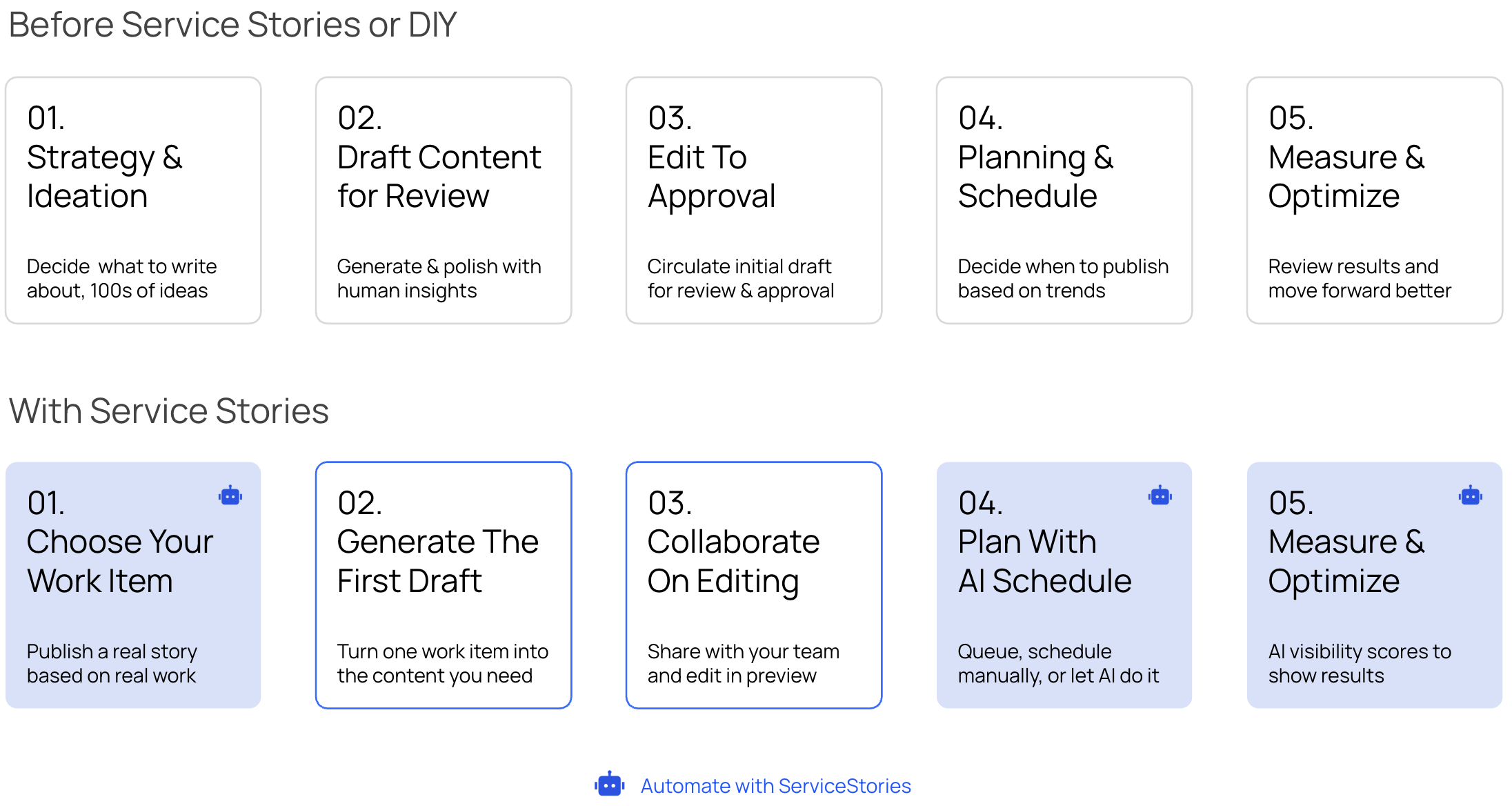
Before we get into the actual working scenarios, which you'll read below, we first need to walk through the level of detail you'll get from engaging in Service Stories. We don't just make things up or guess what you should write about based on what others in your industry are writing about, like most tools do. Here are all the moving pieces that you'd need to do to replicate our services:
Step 1 — Choose your repair orders: Review your completed ROs for the week and select which jobs are worth turning into content. You're looking for jobs with a clear problem, an interesting diagnosis, and a good outcome. You likely also want the jobs that make you the most profit and the jobs your team is most effective at completing! For one blog, you need one good RO. For 10 pieces of content, you need 10 good candidates.
Step 2 — Gather the details: Pull the RO. Collect the vehicle info, mileage, symptom description, what you found, what you did, and any photos from the job. If this lives in Tekmetric, ShopMonkey, or another system, you're copying and pasting or downloading. If it's on paper, you're transcribing. If you didn't handle the work and there's no notes, talk to your team members, get the details.
Step 3 — Run Chuck's prompts (or a similar AI workflow): This is the part Chuck covered well. Use an AI tool to generate the actual content — blog posts, social captions, GBP updates. Plan on at least one full prompt sequence per content type.
Step 4 — Edit every piece for quality: AI drafts are starting points, not finished work. You or someone you trust needs to read every piece and ask: Does this sound like our shop? Is the technical detail accurate? Would a customer actually understand this? Is the hook strong enough to stop a scroll? If you created your project well enough then maybe that's less work each time but if it's not set up well you'll be spending a lot of time editing.
🚨 Critical matters: You need enough marketing intuition to know whether a piece of content is good or not. This is a real skill. If you can't tell the difference between a blog that will rank and one that will tank, you're flying blind. It likely won't kill you to put out content that isn't well made but it definitely won't help, and you will have wasted that time.
Step 5 — Distribute across platforms: Blog posts need to be uploaded to your website and formatted, with images, with proper metadata. Social posts need to be scheduled. GBP posts need to be published. Review responses need to be written and posted individually—and if you're adding work context ("We actually serviced your brakes last month and replaced the rear calipers..."), that means pulling the RO into each.
Step 6 — Track whether it's working: Traffic, AI citations, review volume, GBP views, someone needs to look at this data, be able to understand what it means, and adjust. Or share it with AI and hope its advice is right. This is not a "set it and forget it" step. Some of these tools are free, others are hundreds of dollars a month. You can get basic AI insights with Google Analytics or Google Search Console for your website blog. Every other platform has its own analytics and logins you'll have to bounce between. You also need to know what's good or what's not and ask ChatGPT if you don't know.
In this scenario we're imagining we're a happy family business that owns one shop and doesn't want any more headaches but also knows we need content to get our name out there and compete in the modern world. Or maybe we're a new company that's looking to grow but not certain exactly where to start and hasn't done content before or just doesn't have the budget yet for a full-blown content strategy.
Become visible for the first time or maintain and grow an advantage in search and AI results with a modest but consistent content presence.
At $70/hr owner rate * 2.2 hours/week * 4.3 weeks→ ~$662/mo in labor
~$730/mo to publish one blog per week for one location
None — but this is eating real hours from the person running the shop.
The blog quality drifts when you're busy. You skip a week. Then two. Without a system holding you accountable, consistency breaks down fast.
$199/mo software costs + -0.5 hrs/week x $25/hour * 4.3 weeks= ~$306/mo
This is the shop that's been investing in SEO for years, understands the value and wants to adapt the new way of doing things. This isn't a question about will it work, it's a matter of how fast can they get their hands on it. The goal is 3 blogs/week, 5 Social Posts, 2 GBP, and responses for all customer reviews.
Meaningful content presence across every major channel, with personalized review responses tied to actual work performed.
10–11 hrs/week × 4.3 weeks/mo × $70/hr owner rate→ ~$3,010–$3,311/mo in owner time
~$3,169–$3,470/mo to publish 3 blogs, 5 social media posts across 2 platforms, 2 Google Business posts, and responses to all customer reviews on a weekly basis
At this volume, you're either doing this yourself and neglecting other parts of your business, or you're delegating — but delegation requires training someone to understand content quality, your brand voice, and how to pull ROs with context. Expect 2–5 hours of oversight even with a part-time marketing person.
The editing step is where this breaks. Most shop owners will either skip it (and publish mediocre AI content that doesn't represent them well) or get stuck in the editing weeds and fall behind. The review response step is also deceptively time-consuming if you want to do it right. Unless you want to just leave everyone the same "thanks for choosing us" response, it takes time to write a good review. ServiceStories can craft a response that sounds authentic, and professional, based on the work you actually did for the person.
$499/mo software costs + 2-4 hrs/week x $25/hour * 4.3 weeks= ~$714-$929/mo
$25/hour assumes the average of a single mid-level employee pay rate
This team has grown to 10 shops across a state or region. They understand the value of content but get backed up and overwhelmed trying to create and manage content across their wide-reaching web presence. It has literally turned into something that requires a a team and an investment in growing that team as the company scales.
Consistent, location-specific content across every channel for an 10-location operation — with each location's content reflecting its actual jobs, not generic copy-pasted posts.
This is where the math becomes genuinely alarming.
That's not a typo. That's nearly three full-time employees doing nothing but content. And that's if that's their only focus.
At minimum, you're looking at 2–3 full-time dedicated content/marketing staff — people who understand your shops, your services, and can maintain quality across all eight locations. You'd also need a marketing manager to oversee them, review analytics, and course-correct. That's a real department, not a side task.
84-118 hrs/week × 4.3 weeks × $30/hr equivalent → ~$10,836–$15,222/mo in labor
$30/hour assumes the average of both junior at $22/hour and mid-senior level employee at $45/hour pay rate
~$11,876–$20,712/mo
Everything compounds. A bad week at one location cascades. If one manager doesn't pull their ROs, that location falls behind. If your content person quits, you lose institutional knowledge. If nobody's checking analytics across 8 locations, you're flying blind on a lot of spend. And location-specific review responses — the kind that actually build trust because they reference the real work you did — become nearly impossible to maintain at scale.
With this many locations the company would be eligible for our enterprise discount of 30% after 10 locations or more, meaning they'd be paying only $349/mo/location. In addition to the pricing they'd be saving a significant amount of time:
$3,490/mo software costs + 8–35 hrs/week × $30/hour → ~$4,520–$8,002/mo
$30/hour assumes the average of both junior at $22/hour and mid-senior level employee at $45/hour pay rate
Chuck's prompts work. DIY content generated by AI is a perfectly fine choice if that's the investment you want to make. You can take this guide and go try it on your own. The process works. But the process needs a system, and systems require time, consistency, expertise, and oversight to maintain. What you'll likely find out is that creating the prompts is only the tip of the iceberg.
Service Stories automates the steps above by pulling directly from your shop management system to generating content, and make distribution seamless so you keep the results without building the department.
Service Stories helps service-based businesses turn their daily work into content than ranks in Google and gets mentioned by AI search like ChatGPT
Book Demo